
Getting Help
Everyone needs some help from time to time. Basically thats what the man pages are for.
Man pages
Man (man stands for manual) pages are used to describe the features of commands. They will provide you with a basic description of the purpose of the command, as well as provide details regarding the options of the command.
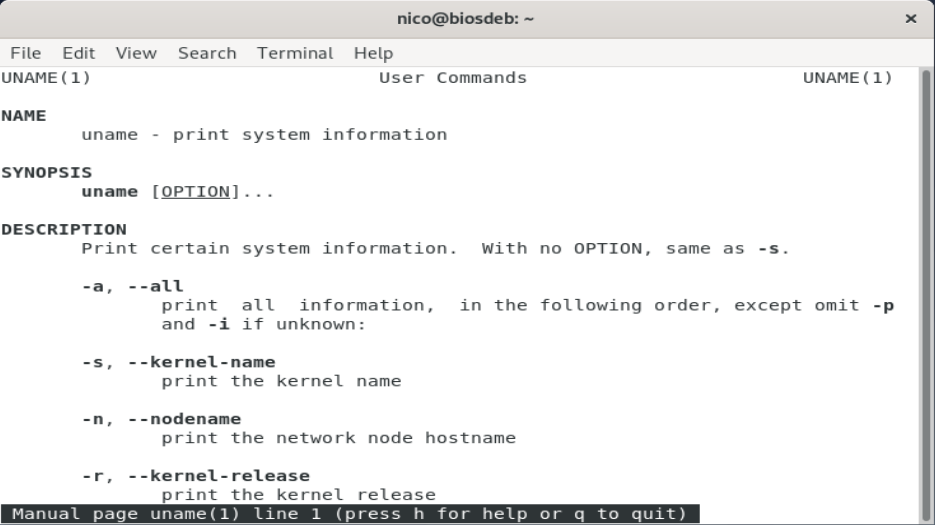
The man command uses a "pager" to display documents. Normally this pager is the less command. A pager is something that most administrators use frequently, to view files, read the results of long command output, and more. Common pager utils are more and less.
The most used commands inside the man pages are listed in the next table.
| Command | Description |
|---|---|
ENTER | Go down a line |
SPACE | Go down a page |
/keyword | Search for keyword |
n | Find next search item |
N | Find previous search item |
g | Goto beginning |
G | Goto end |
h | Show help |
q | Quit man pages |
Sections of a man page
Man pages are broken into sections. Each section is designed to provide specific information about a command.
- NAME: Name of command and brief description.
- SYNOPSIS: Provides examples.
- DESCRIPTION: More detailed description.
- OPTIONS: Lists the options for the command with a description.
- FILES: Lists the files that are associated with the command as well as a description of how they are used. These files may be used to configure the command's more advanced features.
- AUTHOR: The name of the person who created the man page and (sometimes) how to contact the person.
- REPORTING BUGS: Provides details on how to report problems with the command.
- COPYRIGHT: Provides basic copyright information.
- SEE ALSO: Provides you with an idea of where you can find additional information. This also will often include other commands that are related to this command.
Sometimes configuration files also have man pages. Configuration files (sometimes called system files) contain information that is used to store information about the Operating System or services.
Sections of the man pages
There are thousands of man pages on a typical Linux distribution. To organize all of these man pages, the pages are categorized by sections, much like each individual man page is broken into sections.
- Executable programs or shell commands
- System calls (functions provided by the kernel)
- Library calls (functions within program libraries)
- Special files (usually found in /dev)
- File formats and conventions, e.g. /etc/passwd
- Games
- Miscellaneous (including macro packages and conventions)
- System administration commands (usually only for root)
- Kernel routines [Non standard]
When you use the man command, it searches each of these sections in order until it finds the first "match".
For example:
[bioboost@linux][~]$ man echo
To determine which section a specific man page belongs to, look at the numeric value on the first line of the output of the man page.
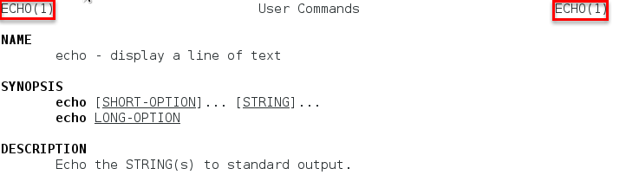
In some cases you will need to specify the section in order to display the correct man page. This is necessary because sometimes there will be man pages with the same name in different sections.
There is for example a man page about the passwd command (section 1) but also about the file /etc/passwd (section 5). To request a man page from a specific section, just add the number before the name of the man page.
[bioboost@linux][~]$ man 5 passwd
Partial Matches
The -f option to the man command will display man pages that match, or partially match, a specific name and provide a brief description of each man page.
[bioboost@linux][~]$ man -f ip
Output
ip (7)               - Linux IPv4 protocol implementation
ip (8)               - show / manipulate routing, network devices, interfaces...
Note that on most Linux distributions, the whatis command does the same thing as man -f.
[bioboost@linux][~]$ whatis ip
Output
ip (7)               - Linux IPv4 protocol implementation
ip (8)               - show / manipulate routing, network devices, interfaces...
Search by Keyword
You can search for a keyword in the man pages names and the short descriptions by using the -k option.
[bioboost@linux][~]$ man -k ssh
Output
authorized_keys (5)  - OpenSSH SSH daemon
rlogin (1)           - OpenSSH SSH client (remote login program)
The apropos command does the same thing as man -k.
[bioboost@linux][~]$ apropos ssh
Output
authorized_keys (5)  - OpenSSH SSH daemon
rlogin (1)           - OpenSSH SSH client (remote login program)
You can use the apropos command to find a specific command based on its description. This is especially helpfull when you know what you want to achieve but don't know what command to use.
Info
The info command also provides documentation on operating system commands and features. The goal of this command is slightly different from the man pages.
Consider man pages to be more of a reference resource and info documents to be more of a learning guide.
You may need to install info: sudo apt install info
[bioboost@linux][~]$ info ls
The info command automatically redirects to man pages if no info exists.
Like the man command, you can get a listing of traverse keys by typing the letter h while reading the info documentation.
Command help
Many commands will also provide you basic information, very similar to the SYNOPSIS found in man pages, when you apply the --help, -h or -? option to the command.
[bioboost@linux][~]$ passwd --help
Output
Usage: passwd [options] [LOGIN]

Options:
  -a, --all                     report password status on all accounts
  -d, --delete                  delete the password for the named account
  -e, --expire                  force expire the password for the named account
  -h, --help                    display this help message and exit
  -k, --keep-tokens             change password only if expired
  -i, --inactive INACTIVE       set password inactive after expiration
Documentation
On most systems, there is a directory where additional documentation is found. This will often be a place where vendors who create additional (third party) software can store documentation files. These documentation files are often called readme files, since the files typically have names such as README or readme.txt.
Typical locations include /usr/share/doc and /usr/doc.